Article 24: How to understand your Customers report
How to understand your Customers report
Your Customers report helps you understand who's booking your laundry service, how often they return and which customers might be worth checking in with.
It's a useful way to see what's happening with your customer base without going through every customer record individually.
Open your Customers report
Select Reports from the main menu.
Open the Customers tab.
Choose the reporting period you want to review.
You can select this month, last month, this financial year, last financial year, the last 12 months or a custom date range.
Understanding your customer figures
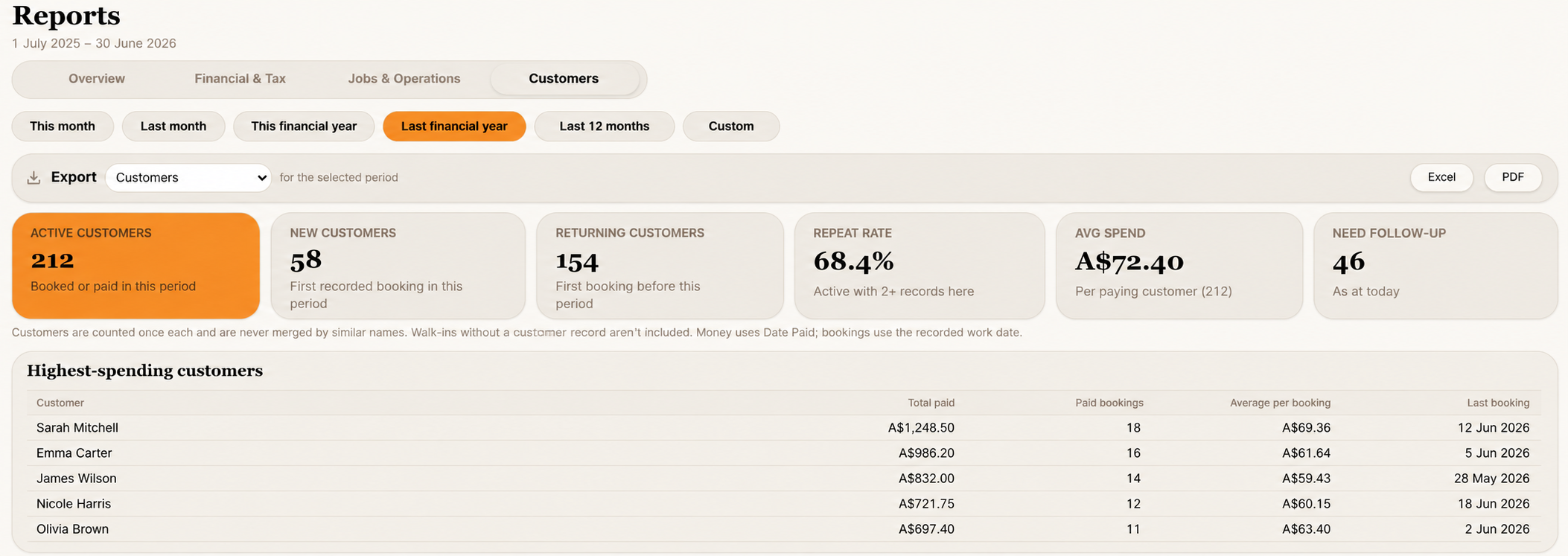
At the top of the page, you'll see six summary cards.
Active customers
The number of individual customers who booked or paid during your selected period.
Each customer is counted once, even if they've made several bookings.
New customers
Customers whose first recorded booking falls within your selected period.
Returning customers
Customers who booked during your selected period but had their first recorded booking before that period.
Repeat rate
The percentage of active customers who have at least two recorded jobs or payment records in Snook.
Average spend
The average amount received per paying customer during your selected period.
Need follow-up
The number of customers Snook currently identifies as needing a follow-up.
Unlike the other figures, this is based on today's customer activity, not just your selected reporting period.
Highest-spending customers
This section shows which customers have spent the most with your business during the selected period.
For each customer, you'll see:
Total money received
Number of paid bookings
Average amount per paid booking
Last recorded booking
This can help you recognise your regular customers and understand how much different customers contribute to your business.
If a customer's work date wasn't recorded, their last booking may show as unavailable even though they have payment history.
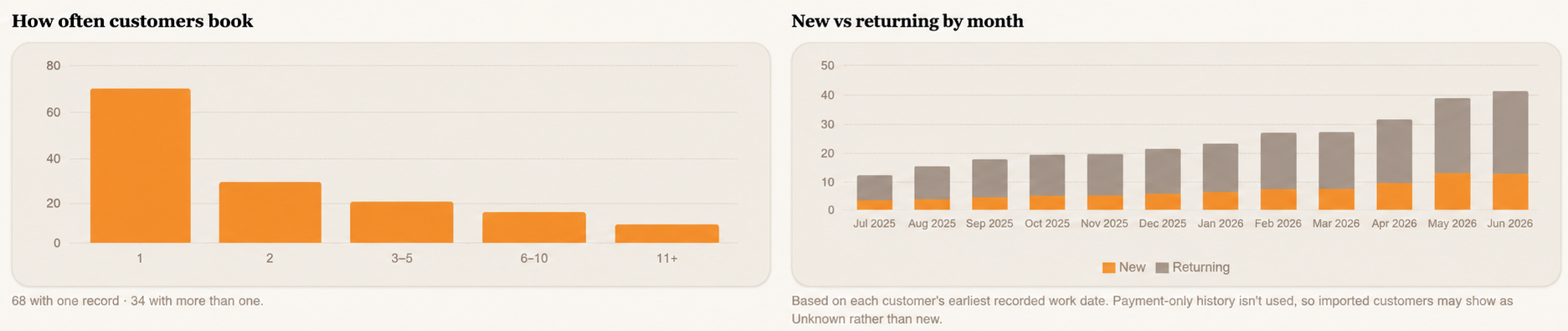
How often customers book
This chart groups customers according to how many records they have in Snook.
You'll see customers with one record, two records, three to five, six to ten, and eleven or more.
It's a useful way to understand how many people have used your service once compared with those who've returned multiple times.
New vs returning by month
This chart shows new and returning customer activity across the selected reporting period.
Snook uses each customer's earliest recorded work date to determine when they first booked.
If you've imported older payment records without work dates, some customers may not be classified as new or returning.
This is because Snook doesn't assume the date someone paid is the date they first booked.
Booking frequency
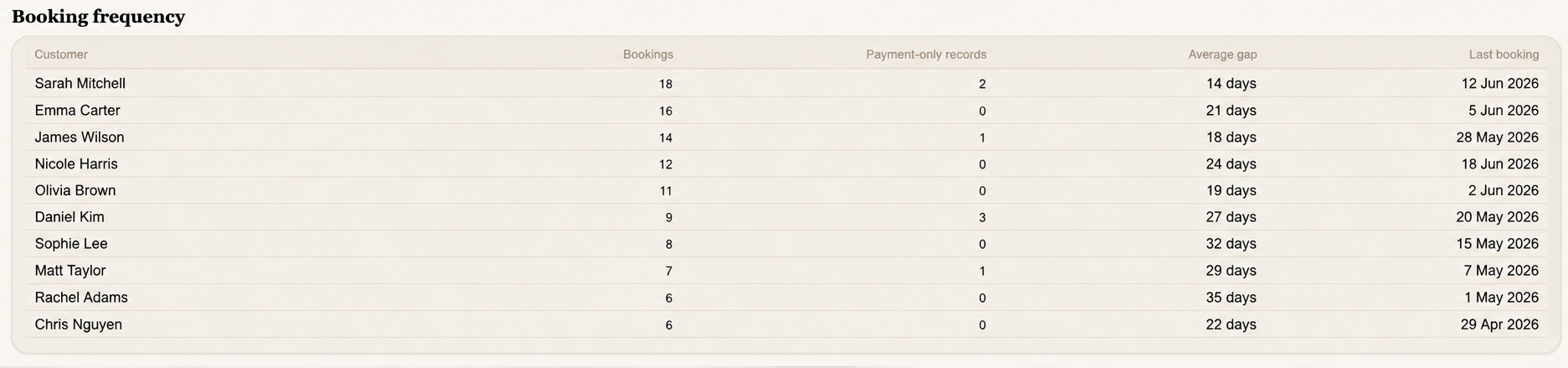
The Booking frequency table gives you a closer look at individual customers.
It shows their recorded bookings, payment-only records, average time between bookings and last booking date.
This can help you understand how regularly customers use your service.
If a customer only has imported payment records without work dates, Snook may not be able to calculate their booking frequency or average gap between bookings.
Their payment history is still retained.
Understanding customer retention
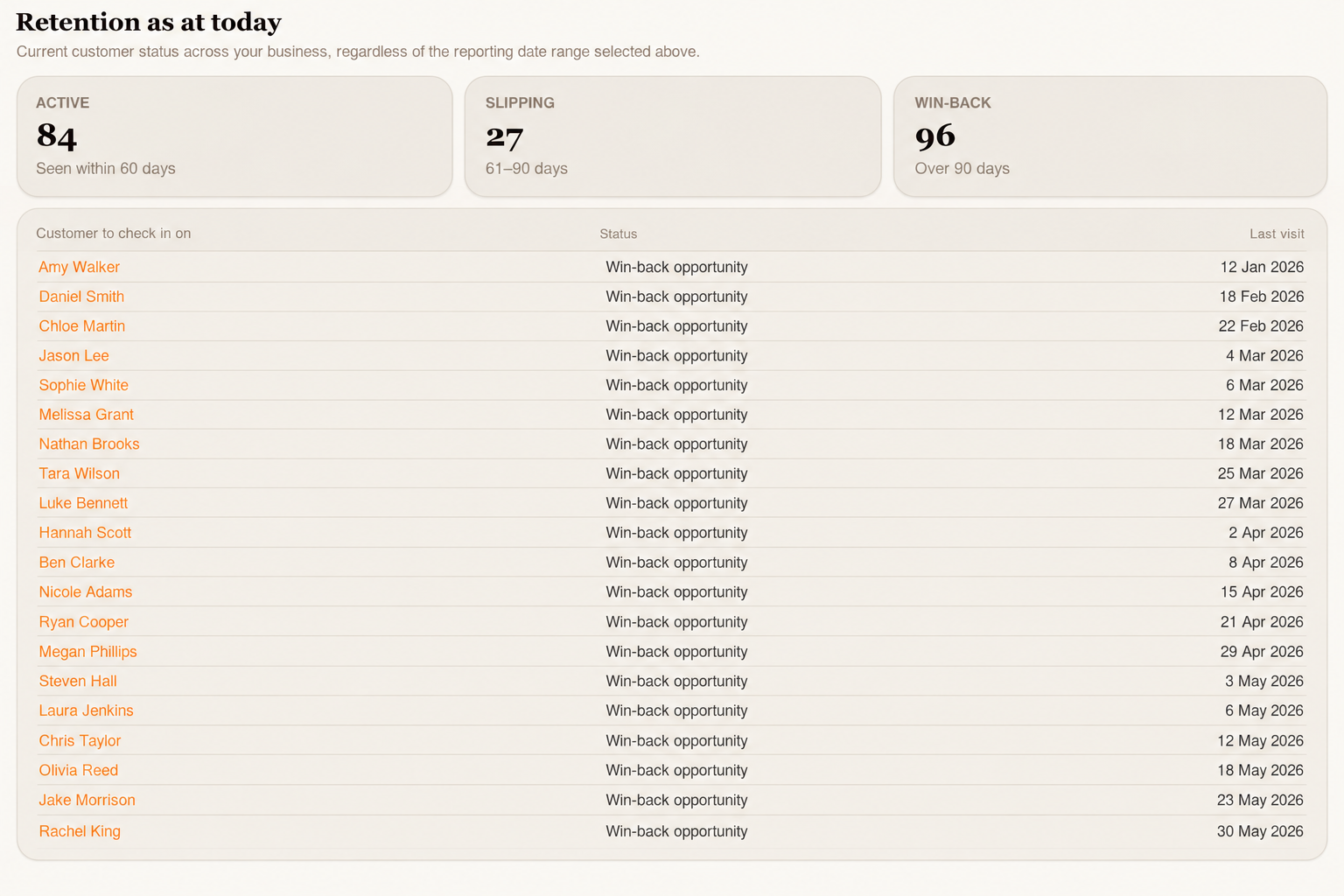
At the bottom of the report, you'll find Retention as at today.
This section groups customers according to how recently they've used your service.
Active
Customers seen within the last 60 days.
Slipping
Customers whose last recorded visit was 61–90 days ago.
Win-back
Customers whose last recorded visit was more than 90 days ago.
Below these figures, you'll find a list of customers to check in on, along with their status and last visit date.
This can help you identify customers who might appreciate a friendly reminder about your laundry service.
Important: The retention section always reflects your customer activity as at today, regardless of the reporting period you've selected.
What if you've imported historical customer records?
If you've imported previous jobs or payments into Snook, some customers may have spending history without recorded work dates.
Their payments can still contribute to your financial and customer spending figures.
However, Snook may not be able to determine when they first booked, how regularly they booked or when their last laundry job was completed.
This doesn't mean their records are missing. It simply means Snook won't invent dates that weren't included in the original records.
Download your Customers report
Open Reports.
Choose your reporting period.
Select Customers from the Export dropdown.
Click Excel or PDF to download your report.
Need help?
Still need a hand? Email us at support@snookapp.au and we'll be happy to help.