Article 32: How to record business mileage
How to record business mileage
If you're collecting and delivering laundry, those kilometers can add up!
Snook has a built-in mileage log to help you keep track of the business trips you make, whether you're collecting laundry, delivering finished orders or travelling for other business purposes.
You can record trips manually or add them directly from Today's Run.
Find your mileage log
Sign in to Snook.
Go to More → Mileage.
You'll see your Mileage dashboard.
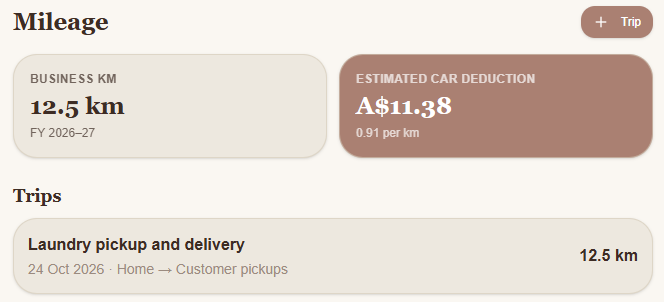
Your dashboard shows your total business kilometers for the financial year, an estimated car deduction and a history of your recorded trips.
How to record a trip manually
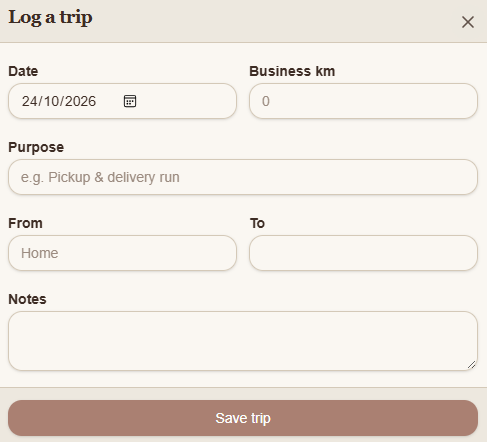
From your Mileage dashboard, click + Trip.
Enter the Date of your journey.
Enter the total Business km travelled.
Under Purpose, describe what the trip was for, such as a laundry pickup and delivery run.
Enter where you travelled From and To.
Add any additional information under Notes, if needed.
Click Save trip.
Your trip will appear in your mileage history, and your total business kilometers will update automatically.
How to record mileage from Today's Run
If you're using Today's Run to organise your collections and deliveries, Snook can help you record the trip without entering all the details yourself.
Open Today's Run in Snook.
Organise your collection and delivery stops.
Select Add to mileage.
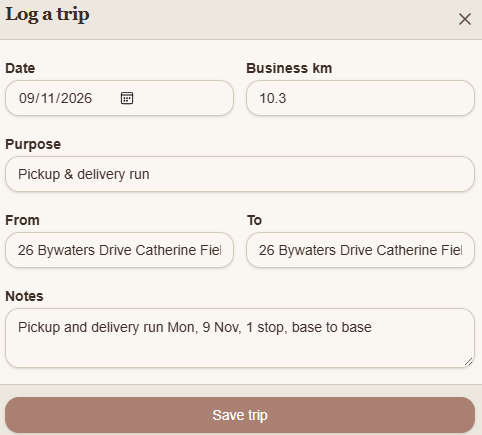
Snook will open the Log a trip form with details already filled in.
Depending on your route, these can include the date, estimated kilometers, trip purpose, start and end locations, and notes about your run.
Check the information and make any necessary changes before clicking Save trip.
Your trip will then be added to your mileage history.
Understanding your estimated car deduction
At the top of your Mileage dashboard, Snook displays an estimated car deduction based on your recorded business kilometers and the rate shown for your account.
For example, recording 12.5 business kilometers at a rate of A$0.91 per kilometer produces an estimated deduction of A$11.38.
This figure is provided as a guide only. Your actual tax deduction will depend on the tax rules that apply to you, including any eligibility requirements, record-keeping obligations and deduction limits.
For advice about what you can claim, speak with your accountant or tax professional.
Keeping accurate mileage records
Try to record your trips as you go rather than remembering them weeks later.
Make sure the kilometers you enter relate to business travel, and check any automatically filled details before saving.
Keeping your trip history up to date makes it easier to review your business travel throughout the year.
Need help?
Having trouble recording your business mileage? Email us at support@snookapp.au and we'll be happy to help.