Article 20: How to manage your business expenses
How to manage your business expenses
Keeping track of what you spend on your laundry business is just as important as keeping track of what you earn.
Snook lets you record your expenses, organise them into categories and keep photos of your receipts together with your records.
Add a new expense
Open Money.
Select the Expenses tab.
Tap + Add an expense.
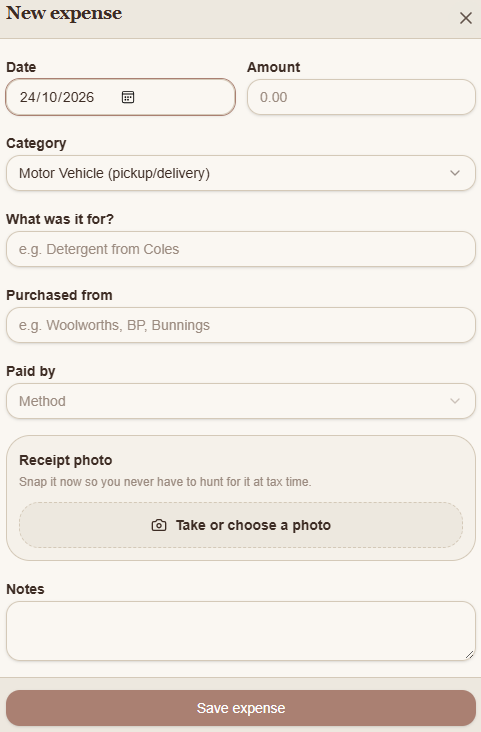
Enter the date and amount you spent.
Choose the expense category.
Enter what you purchased and where you purchased it.
Select how you paid.
Add a receipt photo and any notes if needed.
Tap Save expense.
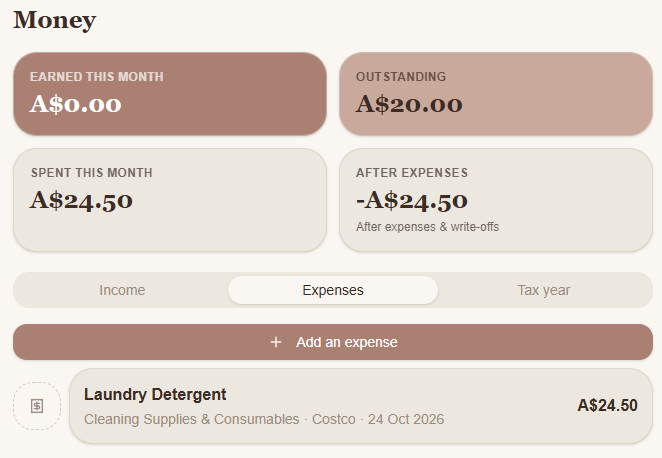
For example, if you purchase $24.50 worth of laundry detergent, you can record it under Cleaning Supplies & Consumables.
Add a receipt photo
When adding or editing an expense, you'll see a Receipt photo section.
Tap Take or choose a photo to photograph your receipt or select an existing image.
Keeping a copy of your receipt with the expense makes it easier to find when you're reviewing your records later.
See how much you've spent
Once you've saved an expense, it appears in your Expenses list.
Snook also updates the figures at the top of your Money page.
Spent this month shows the expenses you've recorded for the current month.
After expenses shows your recorded income after expenses and write-offs.
For example, if you've recorded $24.50 in expenses but haven't received any income yet, your After expenses figure will show -$24.50.
These figures are based on the information you've entered into Snook.
Edit an existing expense
Made a mistake or need to add more information?
Open Money → Expenses.
Tap the expense you want to change.
The expense form will open with its existing details.
Make your changes.
Tap Save expense.
You can also return to an expense to add a receipt photo you didn't have when you first recorded it.
Need help?
Still need a hand? Email us at support@snookapp.au and we'll be happy to help.