Article 37: Understanding Job Statuses
Understanding job statuses
Every laundry job in Snook has a status to help you keep track of what's coming up, what's been finished and what's been cancelled.
There are three job statuses: Upcoming, Completed and Cancelled.
What does each status mean?
Upcoming
The job is scheduled or still in progress.
Use this status for laundry jobs that haven't been completed yet, whether you're waiting to collect the laundry, washing and drying it, or preparing it for delivery.
Completed
The laundry job has been finished.
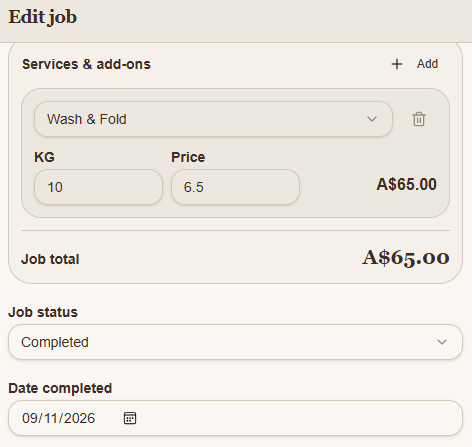
When you change a job to Completed, you can also record the date it was completed.
A completed job doesn't necessarily mean the customer has paid.
Cancelled
The job is no longer going ahead.
Use this status when a customer cancels their booking or the job won't be completed.
How to change a job's status
Sign in to Snook.
Go to Jobs.
Find and open the job you want to update.
Scroll down to Job status.
Choose Upcoming, Completed or Cancelled.
If you're marking the job as Completed, check the Date completed field.
Click Save job.
Your updated job status will be saved in Snook.
What's the difference between job status and payment status?
Job status tells you where the laundry job is up to.
Payment status tells you whether the customer has paid.
These are managed separately in Snook.
For example, you might finish washing, folding and delivering a customer's laundry, so the job is marked Completed.
If the customer hasn't paid their invoice yet, the payment status can still be Unpaid.
The payment options are:
Unpaid: Payment is still outstanding.
Paid: The job has been paid for.
Written off: The amount is no longer being pursued for payment.
If you've issued an invoice, use the invoice's payment actions to record payments received outside Snook.
Need help?
Having trouble updating a job's status? Email us at support@snookapp.au and we'll be happy to help.