Article 16: How to use Today's Run
How to use Today's Run
Today's Run helps you organise your laundry collections and deliveries in one place.
You can see where you're going, contact customers, plan your driving route and record your business kilometres.
View your collections and deliveries
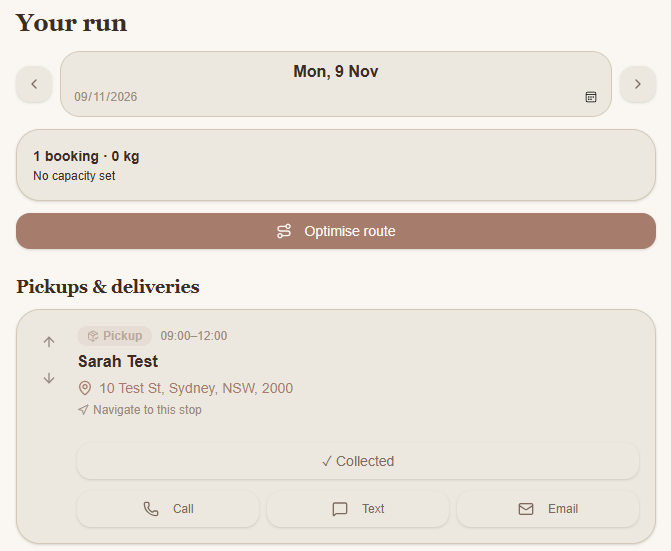
Open Today's Run in Snook.
Use the arrows or calendar to select the date you want to view.
Under Pickups & deliveries, you'll see the bookings scheduled for that day.
Each booking shows the customer's name, collection or delivery time and address.
You can also use the Call, Text or Email buttons to contact your customer.
Plan your driving route
Select the day you want to plan.
Check that your bookings have the correct addresses.
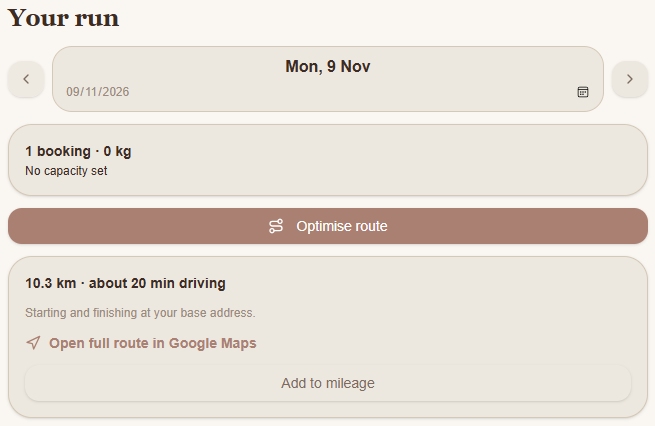
Select Optimise route.
Review the estimated driving distance and travel time.
Select Open full route in Google Maps to view your route and get directions.
Snook uses your business's base address as the starting and finishing point for the route.
Make sure you've entered your base address under My Business.
Record your business kilometres
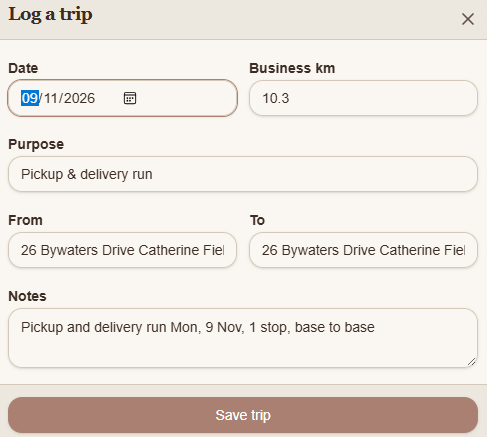
You can add your planned driving route directly to your mileage log.
After optimising your route, select Add to mileage.
Review the date, business kilometres, purpose and addresses.
Adjust any details if needed.
Select Save trip.
Snook will save the trip to your mileage records.
Mark laundry as collected
Once you've picked up a customer's laundry, you can record the collection in Snook.
Find the customer's booking under Pickups & deliveries.
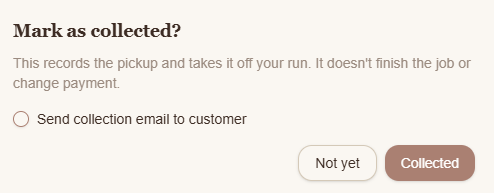
Select Collected.
Tick Send collection email to customer if you'd like to notify them.
Select Collected again to confirm.
Snook records the collection and removes the pickup from your run.
The laundry job remains active, and its payment status doesn't change.
You can continue managing the job through Jobs.
Need help?
Still need a hand? Email us at support@snookapp.au and we'll be happy to help.