Article 14: How to record laundry condition photos and notes
How to record laundry condition photos and notes
Sometimes laundry arrives with an existing stain, tear or other damage.
Snook lets you keep a private record of what you noticed, including photos, so you have something to refer back to if a customer raises a concern later.
Add a condition record
Open Jobs.
Select the job you want to update.
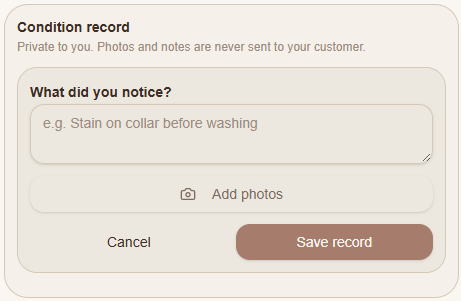
Scroll down to Condition record.
Select + Add.
Under What did you notice?, describe the condition of the item.
Select Add photos if you'd like to include photographs.
Select Save record.
What should you record?
You might want to document an existing stain, a small tear, colour bleeding or an item that appears particularly delicate.
Try to be specific about what you've noticed. For example, instead of writing "shirt damaged", you could write "small tear near the left sleeve seam before washing".
If you're adding photographs, make sure the affected area is clearly visible.
Are condition records private?
Yes. Snook keeps condition records private to your business.
The notes and photos aren't automatically sent to your customer.
If a customer later asks about an item's condition, you can refer back to the information you've recorded.
Need help?
Still need a hand? Email us at support@snookapp.au and we'll be happy to help.