Article 3: How to set your pickup days and times
How to set your pickup days and times
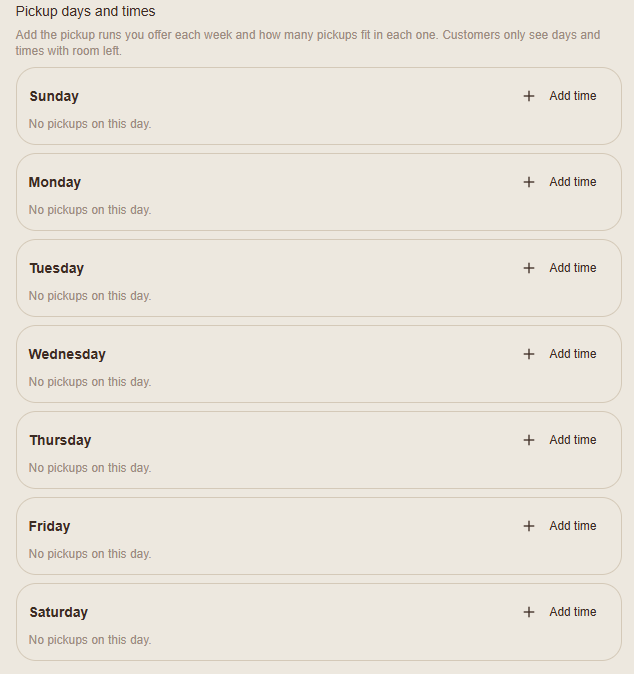
You can choose which days and times customers can book laundry collections, with different booking limits for each pickup window.
Find your pickup settings
Open More → My Business.
Scroll to Booking page & invoices.
Find Pickup days and times.
You'll see all seven days of the week.
Add a pickup window
Find the day you want to offer collections.
Select Add time.
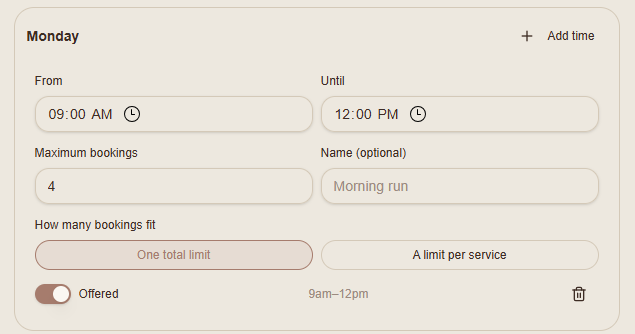
Enter your From and Until times.
Enter the Maximum bookings you can accept.
Add a name if you'd like, such as Morning run.
Make sure Offered is switched on.
You can add multiple pickup windows to the same day.
Choose your booking limit
Under How many bookings fit, choose:
One total limit: One maximum number of bookings across all services in that pickup window.
A limit per service: Separate booking limits for different services.
Choose whichever option suits the amount and type of laundry you can manage.
Change or remove a pickup window
You can update the times and booking limits whenever your availability changes.
Switch Offered off to stop offering a particular window, or select the rubbish bin icon to remove it.
Save your changes
Scroll to the bottom of My Business and select Save.
Snook will display a confirmation message once your changes have been saved.
Your available pickup windows can then be shown to customers on your public booking page.
Need help?
Email support@snookapp.au if you need assistance.