Article 1: How to set up your business
How to set up your business
Your My Business page is where you personalise Snook to suit the way you run your laundry business.
You can add your business details, customise your branding and choose how much laundry you're comfortable taking on.
Open My Business
Sign in to your Snook account.
Open More.
Select My Business.
You'll see your business settings, starting with the Your business section.
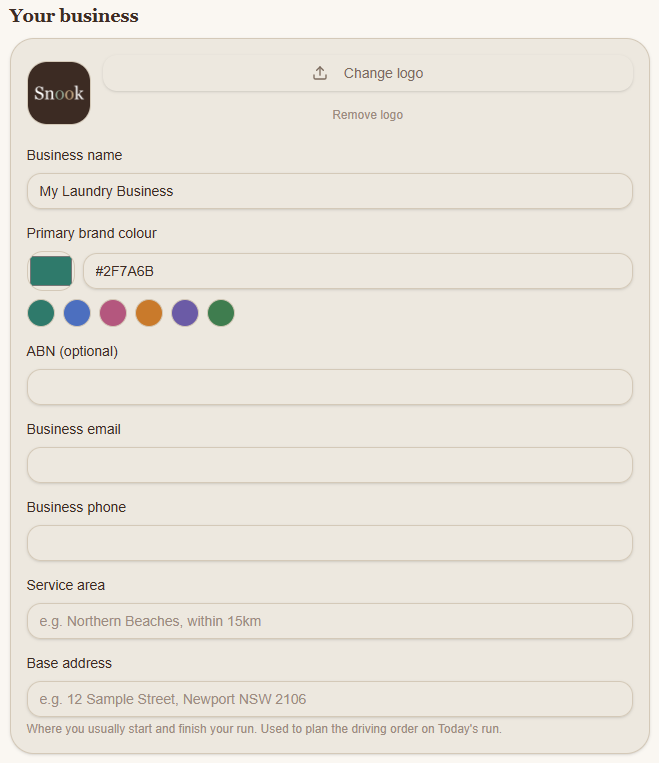
Add your business details
Under Your business, you can enter:
Business name: The name you operate your laundry business under.
Business logo: Select Change logo to upload your logo. You can also remove an existing logo.
Primary brand colour: Choose one of the suggested colours or enter your own colour code.
ABN (optional): Enter your Australian Business Number if you have one.
Business email: Your business contact email address.
Business phone: Your business contact number.
Service area: Describe the suburbs or areas where you provide your laundry service.
Base address: The location you usually start and finish your collection and delivery runs.
Your base address is used to help plan the driving order in Today's Run.
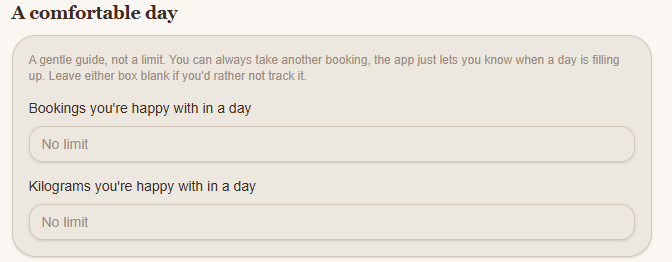
Set a comfortable daily capacity
Scroll to A comfortable day.
Here you can enter:
Bookings you're happy with in a day: The number of bookings you'd ideally like to manage.
Kilograms you're happy with in a day: The amount of laundry you'd ideally like to process.
These are guides, not strict limits. Snook can let you know when a day is filling up, but you can still accept another booking.
Leave either field blank if you don't want to track that limit.
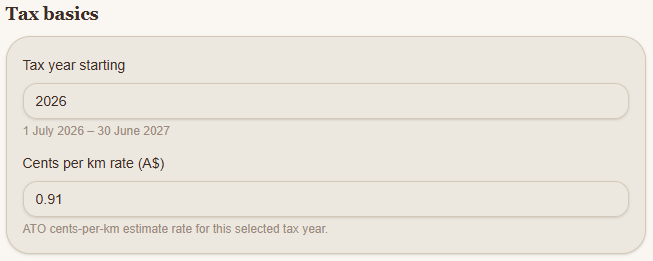
Review your tax basics
Under Tax basics, you'll find:
Tax year starting
Choose the starting year for your financial records. For example, selecting 2026 in an Australian account covers 1 July 2026 to 30 June 2027.
Cents per km rate (A$)
This is the cents-per-kilometer estimate used for your business mileage records. Snook displays a suggested ATO rate for the selected tax year.
Check that the rate and method are appropriate for your circumstances before relying on them for tax reporting.
Save your business settings
Once you've entered your details, scroll to the bottom of My Business and select Save.
Snook will display a confirmation message when your changes have been saved.
What should I set up next?
Once your business details are saved, you can continue setting up Snook by adding your services and prices, choosing your booking availability and configuring your invoices.
You'll find additional settings and shortcuts under Set up elsewhere at the bottom of My Business.
If you need help, email support@snookapp.au.