Article 31: How to share your booking link with customers
How to share your booking link with customers
Snook gives your laundry business its own booking link that you can share with customers.
Instead of going back and forth organising collections through messages, you can send customers directly to your booking page, where they can choose their services, provide their details and select an available pickup date.
Find your booking link
Sign in to Snook.
Go to More → My Business.
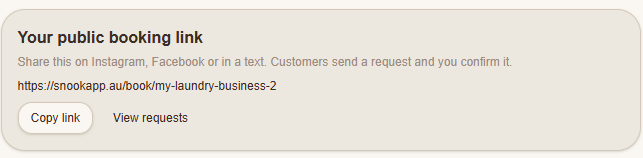
Scroll down to Your public booking link.
Click Copy link.
Your unique booking URL will be copied to your clipboard, ready to paste wherever you need it.
Your link will look something like:
https://snookapp.au/book/my-laundry-business
Your actual link will use your business's unique booking address.
Where can I share my booking link?
You can share your booking link anywhere customers might want to book your laundry service.
Some ideas include:
Facebook: Add it to your business page, posts or replies to customer enquiries.
Instagram: Add it to your bio or share it through direct messages.
Text messages: Send the link directly to customers who want to organise a collection.
Your website: Add a Book Now button that takes customers to your Snook booking page.
Google Business Profile: Add your booking link where an appropriate booking link option is available.
You can also save your booking link somewhere handy on your phone so you don't have to keep opening Snook to copy it.
What happens when a customer opens my link?
Customers can access your booking page without needing a Snook account.
They can enter their contact details, choose the laundry services they need, select an available pickup date and provide any collection instructions.
What happens next depends on your booking settings.
Request a booking: The customer submits a request for you to review, accept, edit or decline.
Instant booking: The customer chooses an available pickup time and their booking is confirmed immediately.
You can change your booking method under More → My Business → Booking page & invoices.
Can I use the same link again?
Yes! Your public booking link can be shared with as many customers as you like.
You don't need to create a new link for every booking.
Customers can return to the same booking page whenever they need your service.
Need help?
Having trouble finding or sharing your booking link? Email us at support@snookapp.au and we'll be h